Boxes
Boxes in the corners of the card, next to the weather, in the Boxes section of the editor. Each has its *_position, top-left, top-right, bottom-left or bottom-right, and a switch: energy_show, people_show, alarm_panel_show and chips_show set to no hide their box and keep its settings, and status_show: yes shows the status box.
In the same corner the boxes stack from the corner, and at the top right under the menus. On a phone, a box at the top left that would meet the menus goes under them, with the boxes after it.
status_show: 'yes'energy_power: sensor.house_powerenergy_solar: sensor.solar_powerenergy_grid: sensor.grid_powerenergy_battery: sensor.battery_levelpeople: - entity: person.anna room: sensor.anna_phone_area # the area of Bermuda - person.marcoalarm_panel: alarm_control_panel.homechips: - sensor.outdoor_temperature - entity: sensor.living_room_co2 name: CO₂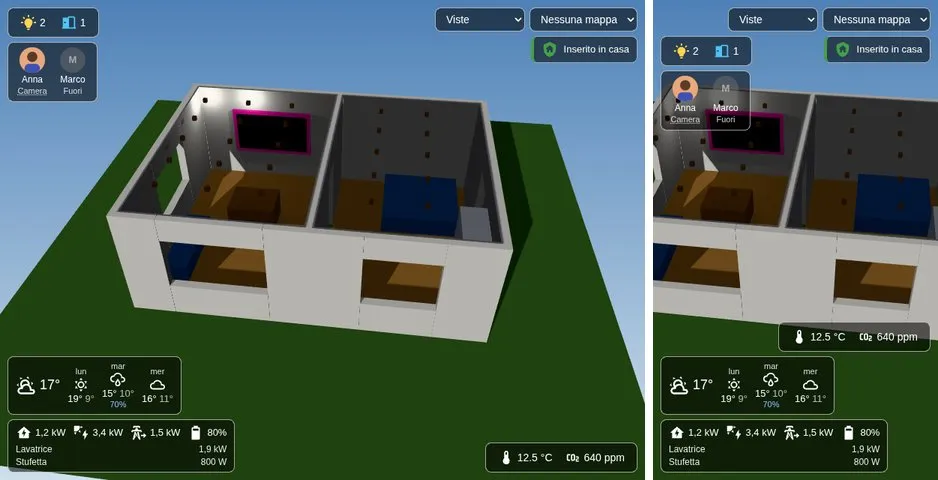
Status
Section titled “Status”status_show: yes (top left): what is on or open among the entities of the card. It counts lamps on (light), doors and windows open (door, or a binary sensor of class door, window, garage door or opening), locks open, and heaters or coolers working (climate). Open shutters and blinds don’t count.
A tap on a number outlines those objects in the model and frames them; with several of them, the next taps outline and frame each one in turn, and the tap after the last one ends it. Ten seconds after the last tap it ends too. At the end the levels, the camera and its zoom go back as they were, unless you moved them meanwhile.
When a tap takes the camera to objects or a room (the status, energy and people boxes, and alarm_view), the level of what it shows and the levels under it are shown and those above hidden, and the camera comes from at least 65° above, from a side where nothing stands between it and what it shows.
Energy
Section titled “Energy”Bottom left: energy_power (the house), energy_solar, energy_grid (positive from the grid, negative to it) and energy_battery (%), each a sensor in W or kW; a tap opens it. Under them, the plugs that use the most now (energy_top, 3): those of energy_plugs, else the power sensors of the rooms. A tap on a plug goes to its room.
People
Section titled “People”people (top left): the people of the house with their picture, grey when they are away, and under the name home, away, or the zone where they are. With room, an entity whose state is a room of the card (the area of Bermuda or ESPresense, for example; names compared without case, spaces, _ and -), the box shows the room, and a tap on it goes there.
Alarm panel
Section titled “Alarm panel”alarm_panel (top right): the state of an alarm_control_panel, green while armed, orange while it changes, red and blinking when triggered. A tap opens it, to arm or disarm.
chips (bottom right): any entity as a chip, with its icon and state; name and icon change them. A tap opens the entity.
Folding
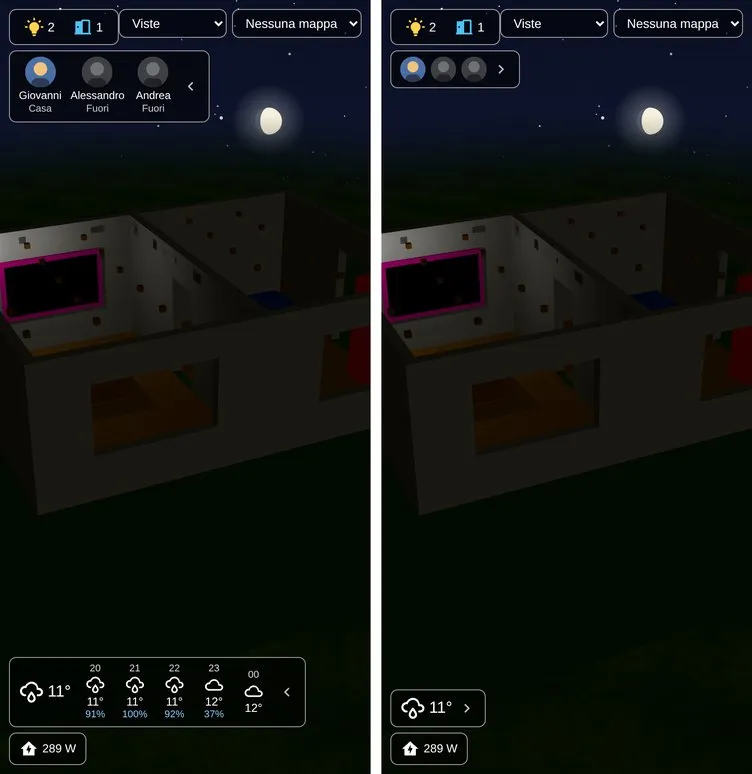
Section titled “Folding”The weather and the people fold: the chevron on the side of the box away from its corner folds it to what matters most, the weather now or the faces of the people, and a tap anywhere on the folded box opens it again. Each device remembers which boxes are folded, so a phone can keep them folded while a computer shows them open.