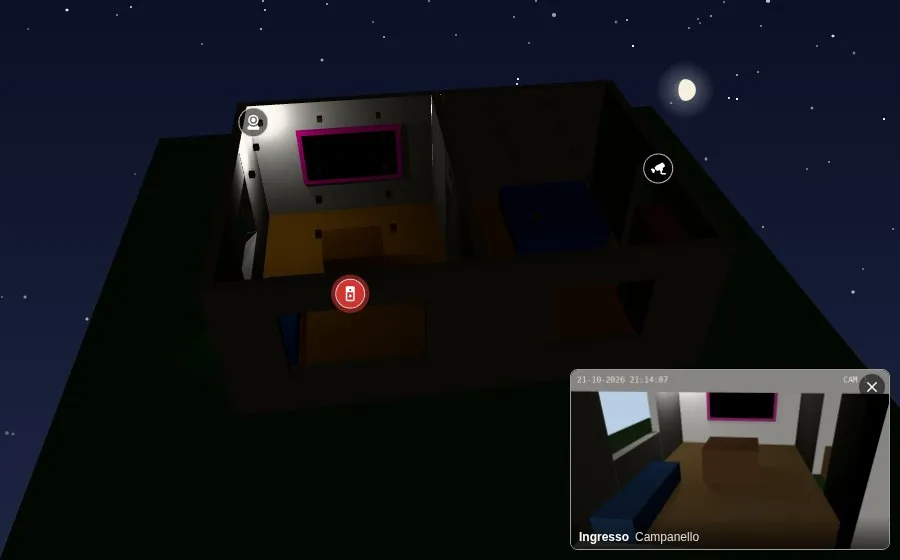
Cameras of the house
cameras lists the cameras of the house (camera.*), in the Cameras of the house section of the editor.
cameras: - entity: camera.front_door position: [510, 240, 990] # picked in the editor icon: mdi:doorbell-video popup_on: - binary_sensor.doorbell - event.front_door_ring - entity: camera.garden position: [1100, 230, 700] - entity: camera.living_room position: [330, 250, 440] popup_on: binary_sensor.living_room_motioncamera_popup_duration: 30On the map
Section titled “On the map”A camera with a position gets an icon over that point of the model. The icon follows the view, hides while its level is hidden (level), and fades while the camera is unavailable; a tap opens the camera with its live. In the editor, Pick in the preview and a tap on the model fill position and, with more than one level, level. name and icon (mdi:cctv) change the name and the icon.
cameras_show: no hides the icons. A button next to the Views and Map menus hides them and shows them again, on each device; cameras_button: no takes it away.
Pop-up
Section titled “Pop-up”popup_on lists the entities that make the picture of the camera pop up: binary sensors (a doorbell, motion, a person detected) or event entities (the doorbell of many integrations). When one goes off, the picture comes in a corner (camera_popup_position, bottom right), a new one every second, with the name of the camera and of the sensor, and the icon of the camera blinks. It stays while the sensor is on and camera_popup_duration seconds after (20). A tap on the picture opens the camera with its live; the cross closes it. camera_popup_show: no hides the pictures; the icons still blink.
The pictures come from the camera proxy of Home Assistant, one a second and only while a picture is shown: no stream, and nothing for the GPU. A camera without position has no icon, but its picture can still pop up.